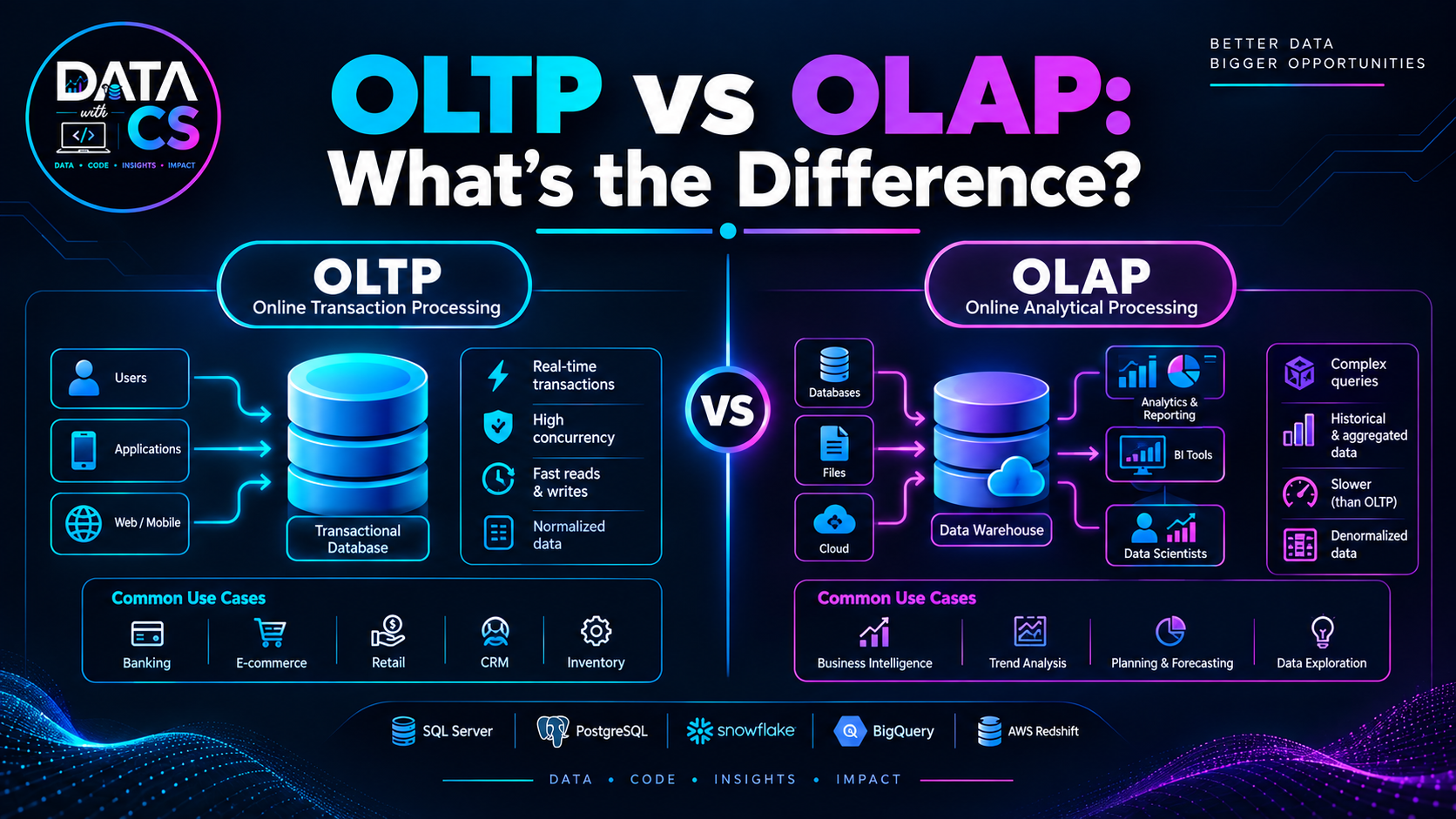
Introduction
Every modern organization depends on data.
Banks process transactions, e-commerce platforms manage orders, hospitals maintain patient records, and businesses track customers, products, payments, and operations.
But not all data systems are designed for the same purpose.
Some databases are designed to handle thousands or millions of day-to-day transactions, while others are designed to analyze large volumes of historical data and support business intelligence.
This is where OLTP and OLAP come in.
OLTP and OLAP represent two different approaches to working with data:
OLTP → Online Transaction Processing
OLAP → Online Analytical Processing
Understanding the difference between OLTP and OLAP is an important foundation for anyone learning SQL, databases, data warehousing, or data engineering.
What Is OLTP?
OLTP stands for Online Transaction Processing.
OLTP systems are designed to manage and process everyday business transactions.
These systems typically handle operations such as:
- Creating an order
- Making a payment
- Updating customer information
- Booking a ticket
- Transferring money
- Registering a user
- Updating inventory
The primary goal of an OLTP system is to process transactions quickly, accurately, and reliably.
For example, when you purchase something from an e-commerce website, several transactions may happen:
Customer places order → Payment processed → Inventory updated → Order created
The underlying systems need to process these operations efficiently.
What Is OLAP?
OLAP stands for Online Analytical Processing.
OLAP systems are designed for analyzing large amounts of data.
Instead of focusing on individual transactions, OLAP systems help answer questions such as:
- What were our sales last quarter?
- Which products generated the most revenue?
- Which region has the highest sales?
- How has revenue changed over five years?
- Which customer segment generates the most revenue?
- What are the monthly sales trends?
OLAP systems are commonly associated with:
- Data warehouses
- Business intelligence
- Reporting
- Analytics
- Historical analysis
- Decision support
A business analyst might use an OLAP system to analyze millions or billions of records and create dashboards for business users.
OLTP vs OLAP: The Basic Difference
The easiest way to understand the difference is:
OLTP is optimized for transactions.
OLAP is optimized for analysis.
For example:
OLTP
A customer purchases a laptop.
The system needs to:
- Create the order.
- Process the payment.
- Update inventory.
- Store the transaction.
OLAP
The business wants to know:
"How many laptops did we sell in each city during the last 12 months?"
The analytical system can process historical data to answer that question.
OLTP vs OLAP Comparison
FeatureOLTPOLAP
Full Form
Online Transaction Processing
Online Analytical Processing
Primary Purpose
Process transactions
Analyze data
Data Type
Current operational data
Historical and aggregated data
Workload
Read/write transactions
Mostly analytical queries
Query Type
Short and simple
Complex and analytical
Transaction Volume
Very high
Usually fewer queries
Response Requirement
Very fast transactions
Optimized for analytical workloads
Database Design
Often normalized
Often dimensional/analytical
Users
Applications, customers, operational staff
Analysts, managers, data scientists
Typical Use
Orders, payments, bookings
Reporting, dashboards, forecasting
How OLTP Works
Consider an online shopping platform.
The application may have tables such as:
- Customers
- Products
- Orders
- Order Items
- Payments
- Inventory
When a customer places an order, the application performs multiple database operations.
For example:
Customer
↓
Create Order
↓
Add Order Items
↓
Process Payment
↓
Update Inventory
The database needs to ensure that these transactions are processed correctly.
If something goes wrong, the system may need to roll back the transaction to prevent inconsistent data.
This is why transaction management and database consistency are extremely important in OLTP systems.
Key Characteristics of OLTP
1. High Transaction Volume
OLTP systems may process a very large number of transactions.
Examples include:
- Banking transactions
- Online orders
- Ticket bookings
- Food delivery orders
- ATM transactions
2. Fast Response Time
Individual transactions should generally complete quickly.
A customer placing an order shouldn't have to wait several minutes for a simple database operation.
3. Current Data
OLTP systems primarily support operational activities using current application data.
4. Frequent Inserts and Updates
OLTP systems commonly perform:
- INSERT
- UPDATE
- DELETE
- SELECT
continuously throughout the day.
5. Data Consistency
Maintaining accurate and consistent transactional data is critical.
For example, an inventory system should not accidentally allow the same product quantity to be sold multiple times because of inconsistent updates.
What Is an OLAP System Used For?
OLAP systems support analytical workloads.
Imagine a retail company with ten years of sales data.
The business may want to analyze:
- Revenue by year
- Revenue by month
- Sales by region
- Sales by product
- Customer purchasing behavior
- Product performance
- Seasonal trends
These queries may involve large amounts of data and multiple tables.
An OLAP system is designed to support this type of workload.
Key Characteristics of OLAP
1. Large Volumes of Data
OLAP systems can work with large historical datasets.
2. Complex Queries
Analytical queries often involve:
- Multiple JOINs
- Aggregations
- GROUP BY
- Window functions
- Calculations
- Time-based analysis
For example:
SELECT
region,
DATE_TRUNC('month', order_date) AS month,
SUM(revenue) AS total_revenue
FROM sales
GROUP BY region, DATE_TRUNC('month', order_date);
The purpose is not to process one transaction.
It is to analyze many transactions together.
3. Historical Data
OLAP systems often maintain historical information so organizations can identify trends and patterns.
4. Read-Heavy Workloads
OLAP workloads are generally dominated by analytical reads rather than frequent small transactional updates.
5. Aggregation
OLAP systems are commonly used for calculations such as:
- SUM
- AVG
- COUNT
- MIN
- MAX
and more complex analytical operations.
OLTP Database Examples
Common technologies used for transactional workloads include:
- PostgreSQL
- MySQL
- Microsoft SQL Server
- Oracle Database
- Microsoft SQL Server
- Other relational and transactional database systems
The important point is that OLTP describes a workload and system purpose, not simply a particular database product.
A database technology can support different workloads depending on how it is designed and used.
OLAP Database Examples
Modern analytical environments can include:
- Snowflake
- Google BigQuery
- Amazon Redshift
- Databricks
- Azure Synapse Analytics
- Other analytical databases and lakehouse platforms
Again, OLAP refers to the analytical workload and architecture rather than being limited to one specific technology.
OLTP Database Design
OLTP databases are commonly designed around normalized relational models.
Normalization can help reduce unnecessary duplication and maintain data consistency.
For example, an e-commerce system might separate:
Customers
Orders
Products
Order Items
Instead of storing everything in one large table.
A simplified relationship could look like:
Customers
|
| 1
|
| many
Orders
|
| 1
|
| many
Order Items
|
| many
|
Products
This structure supports transactional operations efficiently.
OLAP Database Design
OLAP systems commonly use analytical data models.
One widely used approach is the star schema.
A star schema typically contains:
Fact Table + Dimension Tables
For example:
Date
|
|
Customer — Sales Fact — Product
|
|
Region
The sales fact table might contain:
- Sales amount
- Quantity
- Order date key
- Customer key
- Product key
- Region key
Dimension tables provide descriptive information about those entities.
This structure makes analytical queries easier to organize.
Fact Tables vs Dimension Tables
Understanding fact and dimension tables is important when learning OLAP and data warehousing.
Fact Table
A fact table generally stores measurable business events.
Examples:
- Sales
- Orders
- Payments
- Transactions
Possible columns:
- Order ID
- Product ID
- Customer ID
- Date ID
- Quantity
- Revenue
Dimension Table
Dimension tables provide descriptive context.
Examples:
Customer Dimension
- Customer ID
- Customer Name
- City
- State
- Customer Segment
Product Dimension
- Product ID
- Product Name
- Category
- Brand
Together, facts and dimensions make analytical reporting easier.
OLTP vs OLAP: A Real-World Example
Let's take a food delivery application.
OLTP System
A customer places an order.
The system needs to:
- Create the order
- Store the order items
- Process payment
- Update restaurant order status
- Update delivery information
These are transactional operations.
OLAP System
The company wants to analyze:
- Daily order volume
- Average order value
- Revenue by city
- Top restaurants
- Delivery performance
- Monthly growth
- Customer retention
This requires analytical processing across large amounts of historical data.
The two systems serve different purposes.
How OLTP and OLAP Work Together
OLTP and OLAP are not necessarily competing systems.
In many data architectures, they work together.
A simplified architecture looks like:
OLTP SYSTEMS
|
┌──────────┼──────────┐
| | |
MySQL PostgreSQL SQL Server
| | |
└──────────┼──────────┘
↓
Data Ingestion
↓
ETL / ELT Pipeline
↓
Data Warehouse/Lakehouse
↓
OLAP
↓
BI / Analytics / Reporting
The operational systems handle business transactions.
Data pipelines move relevant data into analytical storage.
The analytical environment is then used for reporting and analysis.
Why Shouldn't We Run Analytics Directly on OLTP?
It may seem easier to run every analytical query directly against the production database.
But heavy analytical queries can compete with operational workloads for database resources.
For example, imagine an e-commerce production database processing thousands of orders.
At the same time, an analyst runs a query scanning several years of transaction data.
That analytical query could consume significant CPU, memory, or I/O resources.
This can potentially affect the performance of the operational application.
Separating analytical workloads into an OLAP environment can help isolate these workloads.
The exact architecture depends on the organization's scale and requirements.
OLTP vs OLAP: Query Examples
OLTP Query
An application might retrieve one customer's order:
SELECT *
FROM orders
WHERE order_id = 10245;
This is a relatively targeted transactional query.
OLAP Query
An analyst might calculate yearly revenue by region:
SELECT
region,
EXTRACT(YEAR FROM order_date) AS year,
SUM(revenue) AS total_revenue
FROM sales
GROUP BY region, EXTRACT(YEAR FROM order_date);
This query processes and aggregates many records.
The two queries represent very different workloads.
OLTP vs OLAP Interview Question
A common data engineering interview question is:
"What is the difference between OLTP and OLAP?"
A concise answer is:
OLTP systems are designed for fast, reliable processing of day-to-day transactions, while OLAP systems are designed for analyzing large amounts of historical data and supporting reporting and business intelligence.
For interviews, don't stop with the definition.
Be prepared to explain:
- Real-world examples
- Database design
- Normalization vs dimensional modeling
- Transaction processing
- Analytical queries
- ETL/ELT pipelines
- Data warehouses
- Fact and dimension tables
Common Mistakes Beginners Make
Mistake 1: Thinking OLTP and OLAP Are Just Database Names
OLTP and OLAP primarily describe workloads and system purposes.
They are not simply two specific database products.
Mistake 2: Thinking OLTP Is Only for SQL Databases
OLTP is a workload pattern. Many database technologies can support transactional workloads.
Mistake 3: Thinking OLAP Means Only Dashboards
OLAP supports many analytical workloads, including reporting, exploratory analysis, business intelligence, and other data analysis.
Mistake 4: Ignoring Data Modeling
Understanding normalization, star schemas, fact tables, and dimensions is important for data engineering.
What Should You Learn After OLTP and OLAP?
Once you understand OLTP and OLAP, a practical next step is to learn how data moves between them.
A useful learning sequence is:
SQL
↓
Relational Databases
↓
OLTP
↓
ETL & ELT
↓
Data Warehousing
↓
OLAP
↓
Data Modeling
↓
Star Schema
↓
PySpark
↓
Cloud Data Platforms
↓
Orchestration
↓
End-to-End Data Engineering Projects
This progression helps connect database fundamentals with modern data engineering.
Final Thoughts
OLTP and OLAP serve different purposes in the data ecosystem.
OLTP focuses on running the business.
OLAP focuses on analyzing the business.
An operational system may process an individual customer order in real time, while an analytical system may analyze millions of orders to understand sales trends.
A typical modern data architecture can connect both through data pipelines:
OLTP → ETL/ELT → Data Warehouse/Lakehouse → OLAP → Analytics
If you're learning data engineering, understanding this flow is essential.
Don't just memorize the difference between OLTP and OLAP.
Practice building a small transactional database, move its data through an ETL or ELT pipeline, create an analytical model, and then run analytical queries.
That is where database concepts start becoming practical data engineering skills.
Continue Your Data Engineering Journey with DataWithCS
Build your foundation in SQL, Python, databases, ETL, data warehousing, PySpark, cloud technologies, and real-world data pipelines with DataWithCS.
Learn the concepts. Build the systems. Work with real data.